






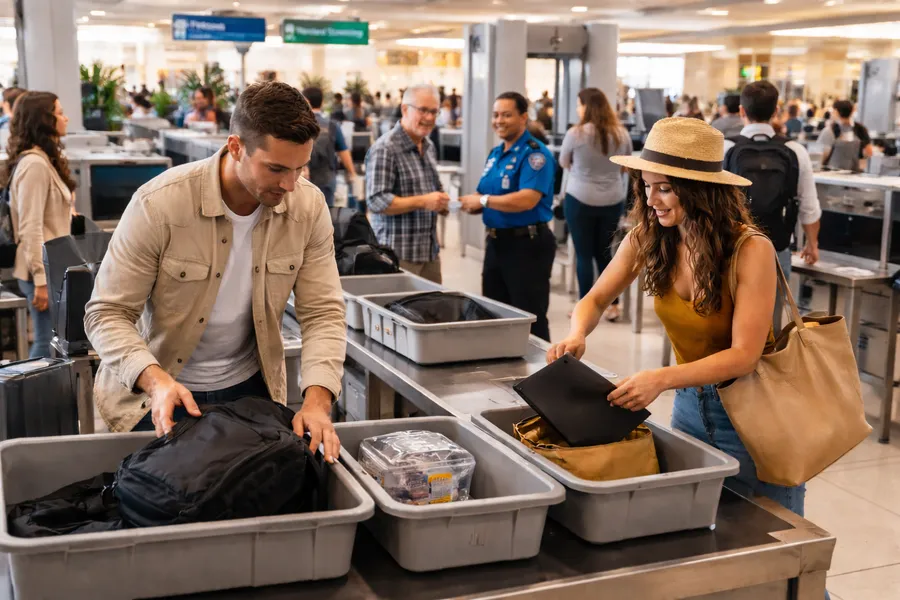
During screening, TSA officers target items that obscure X-ray views, mimic explosives, or indicate security risks. Any powder-like substance (e.g., protein powder, baby powder, or coffee) over 12 oz (350 mL) must be placed in a separate bin for X-ray screening. “Smearable" substances such as jellies and jams over 3.4 oz. will be flagged for removal. Passengers should use expedited screening (like TSA PreCheck) or travel midweek and early morning, when there are shorter lines.
In this article
Airport stress is unavoidable, but support makes a difference. If you want insight from people who deal with delays daily, these Kiwi.com reviews from our flight crew members show how Kiwi.com helps travelers stay on track when airports get chaotic.
Step by Step: What Happens at TSA Security
Going through TSA security in 2026 involves a standard series of steps designed to verify your identity and screen your belongings. While new technologies such as Touchless ID are expanding at major airports, the core process remains consistent for most travelers.
1. Document Check
Arrival at Checkpoint
Enter the appropriate lane (Standard, TSA PreCheck®, or CLEAR).
Find flights for this trip

Verification
Present your government-issued ID and boarding pass to the TSA officer. Ensure you have a REAL ID-compliant driver’s license or another acceptable form of identification like a passport. (Starting February 1, 2026, passengers without a REAL ID or acceptable alternative must pay a $45 fee for identity verification via TSA ConfirmID.)
Biometrics
At many 2026 checkpoints, you may use Digital ID or facial recognition scanners, which can eliminate the need to show a physical boarding pass at this stage.
2. Divesting Items for X-Ray
Electronics
Remove laptops and personal electronic devices larger than a cell phone from your bag and place them in a bin with nothing on or under them.
Liquids
Remove your one quart-sized bag of liquids (3-1-1 rule: 3.4oz/100ml or less per container) and place it in a bin.
Clothing & Pockets
Remove your shoes, belt, and light outerwear (jackets/sweaters). Empty all items from your pockets, including non-metallic items like tissues or wallets, into a bin or your carry-on bag.
Carry-On Bags
Place your main carry-on and personal item directly on the conveyor belt or in bins as directed.
3. Personal Screening
The Scanner
Walk through the Advanced Imaging Technology (AIT) booth or walk-through metal detector. For AIT, you will stand with your feet apart and arms above your head for a few seconds.
Secondary Screening
If the scanner triggers an alarm, you may be subject to a pat-down by an officer of the same sex or a hand-wand inspection.
Random Checks
You may be randomly selected for a swab of your hands or luggage to check for explosive residue.
4. Collecting Belongings
Retrieve Items
Once you pass through the scanner, wait for your bags and bins to come out of the X-ray scanner.
Secondary Bag Search
If an item in your bag is flagged, an officer will open it in your presence for a manual inspection.
Reassemble
Move to a designated “re-composure” area away from the belt to put on your shoes and belt and repack your electronics.
Key Differences for Expedited Programs
TSA PreCheck®
You generally do not need to remove shoes, belts, light jackets, laptops, or 3-1-1 liquids.
CLEAR
Uses biometrics (eyes or fingerprints) to skip the document check line and proceed directly to the physical screening area.
Items That Trigger Extra Screening
TSA officers and high-tech scanners look for items that obscure X-ray views, mimic explosives, or indicate security risks. Even permitted items may trigger a manual bag search if they create an ambiguous image on the scanner.
High-Density Foods and Substances
Items with a density similar to plastic explosives (like C4) frequently trigger extra screening.
Dense Foods
Large blocks of cheese, jars of peanut butter, hummus, chocolate, and even dense wrapped candies could lead to further screening.
Powders
Any powder-like substance (e.g., protein powder, baby powder, or coffee) over 12 oz (350 mL) must be placed in a separate bin for X-ray screening and may undergo a swab test.
Spreadable Items
TSA considers any “smearable” substance (jellies, jams, creams) a liquid. Therefore, if they exceed 3.4 oz, they will be flagged for removal.
Electronics and Batteries
Improperly packed electronics are a primary reason for manual bag inspections.
Tangled Wires
Large “nests” of charging cables or loose wires can look suspicious on X-rays. Make sure to bundle them neatly in a pouch.
Lithium Batteries
Spare lithium-ion batteries and power banks are strictly prohibited in checked bags. If found during screening, they will be removed and may lead to a search of your entire bag.
Cordless Hair Tools
New for 2026, cordless curling irons and flat irons containing lithium batteries or gas/butane cartridges are banned from checked luggage. They must be in your carry-on with a secure safety cover.
Obstructive or Suspicious Objects
Dense Paper
Large stacks of books, heavy catalogs, or thick reams of paper are difficult for X-rays to penetrate and often require a physical inspection.
Wrapped Gifts
TSA officers must be able to see the contents of a package; wrapped gifts are often opened for inspection.
Unusual Shapes
Musical instruments, specialized tools, and souvenir items like snow globes (which contain liquid) frequently trigger alerts.
Clothing and Jewelry
Bulky Items
Thick hoodies, heavy jackets, or excessively baggy clothing may trigger a pat-down if they create an unclear silhouette on the body scanner.
Metallic Triggers
Large metal belt buckles, boots with metal plates/shanks, and underwire bras can set off metal detectors or AIT scanners.
Lotions and Creams
Personal care products containing glycerin can occasionally trigger a false positive during explosive trace detection (swabbing).
Differences Between TSA PreCheck and Standard Screening Explained
TSA PreCheck is a program offering expedited security screening for flights departing from US airports, allowing members to keep on shoes, belts, and light jackets, and leave laptops anda liquids in bags. Enrollment involves an online application, appointment for fingerprints, a background check and a fee, with benefits lasting five years. It is faster, more convenient airport security experience than standard screening and provides dedicated lanes, shorter waits, and fewer divestitures at participating airports. Apply online or at enrollment centers through providers like IDEMIA, Telos and CLEAR.
TSA PreCheck
Benefits
- Dedicated Lanes: Use separate, shorter lines at checkpoints.
- Less Divestiture: Keep shoes, belts, light jackets, laptops, and 3-1-1 compliant liquids in your bags.
- Faster Screening: Generally results in significantly shorter wait times, with 99% of passengers waiting under 10 minutes (as of late 2025).
- Eligibility : U.S. citizens, nationals, and lawful permanent residents can apply, with membership valid for 5 years.
The Fee
In 2026, the fee for TSA PreCheck enrollment depends on the provider you choose for your in-person appointment. All memberships are valid for five years.
TSA PreCheck Enrollment Fees (5-Year Membership)
| Enrollment Provider | New Application Fee | Online Renewal Fee |
|---|---|---|
| IDEMIA | $78.00 | $70.00 |
| CLEAR | $79.95 | $69.95 |
| Telos | $85.00 | $70.00 |
Important New 2026 Fee
Starting February 1, 2026_,_ travelers without a REAL ID or other acceptable identification (like a passport) will be required to pay a non-refundable $45 fee to use the “ConfirmID” biometric verification system. This fee is separate from the standard TSA PreCheck membership fee and only grants access for a 10-day travel period.
Alternative Programs
- Global Entry: Costs $120 for 5 years and includes TSA PreCheck benefits. This is often considered a better value for international travelers.
- CLEAR Plus : Costs $209 annually and provides expedited identity verification.
Pro Tip
Many credit cards and loyalty programs provide statement credits that reimburse the TSA PreCheck or Global Entry application fee, making the service essentially free. Check with your credit card or loyalty program provider if you qualify.
Standard Screening
Process
Travelers go through regular lanes, must remove shoes, belts, light jackets, laptops, and liquids, and place them in bins for separate X-ray screening.
 Kiwi.com news
Kiwi.com Reviews from Our Proud Flight Crew Members
Honest Kiwi.com reviews from real Flight Crew travelers. See how they book cheap flights, use price alerts, and travel with the Kiwi.com Guarantee.
Read the guide
Kiwi.com news
Kiwi.com Reviews from Our Proud Flight Crew Members
Honest Kiwi.com reviews from real Flight Crew travelers. See how they book cheap flights, use price alerts, and travel with the Kiwi.com Guarantee.
Read the guideWait Times
Often experiences longer lines and more thorough checks.
Key Differences Summarized
- Speed: PreCheck is much faster due to dedicated lanes and reduced divestiture.
- Convenience: PreCheck allows you to keep more items on you and in your bag.
- Access: PreCheck requires enrollment and a fee; standard screening is for all other travelers.
TSA Screening Rules for Electronics, Shoes, and Clothing
In 2026, TSA screening rules have seen significant updates, most notably a nationwide change to footwear policies that took effect in mid-2025.
Shoes
General Rule
As of July 7, 2025, all travelers – including those in standard screening lanes – are permitted to keep their shoes on during airport security. This applies nationwide. But TSA officers may still ask you to remove your shoes if they trigger an alarm (e.g., due to high metal content).
Recommendation
While no longer required, wearing easily removable shoes is still suggested in case secondary screening is necessary.
Electronics
Personal Electronics
Devices larger than a cellphone (e.g., laptops, tablets) must be removed from your carry-on and placed in a bin for X-ray screening.
Small Electronics
Items like cellphones, electric toothbrushes, or shavers can typically stay in your bag, though you should ensure they are secured against accidental activation.
Batteries
Portable chargers and power banks containing lithium-ion batteries must be in carry-on bags; they are prohibited in checked luggage.
TSA PreCheck
Members can typically keep laptops and other electronics inside their bags during screening.
Clothing and Accessories
Outerwear
You must remove “light” outerwear and bulky clothing. This includes blazers, vests, sport coats, light jackets, large sweaters, cardigans, and oversized hoodies.
Belts and Jewelry
Unless you have TSA PreCheck, you are generally required to remove belts, especially those with metal buckles. Large or bulky jewelry should also be removed to avoid triggering alarms.
Pockets
Ensure all pockets are completely empty of keys, coins, tissues, and phones before stepping through the scanner.
Head Coverings
These may be worn but are subject to screening; a TSA officer may ask for a pat-down of the head covering if it cannot be cleared by the scanner.
Random Searches and Secondary Screening Explained
Airport security uses a multi-layered approach to screening, ranging from randomized checkpoint tests to pre-assigned intensive inspections.
Random Screening at Checkpoints
Common Checks
You might be pulled aside for a hands or luggage swab to detect explosive trace residue.
Equipment Triggers
New 2026 CT scanners may flag dense objects like heavy books, stacks of paper, or a “tangled mass” of electronics and wires for manual inspection.
Behavioral Monitoring
Officers trained in observation techniques look for indicators of extreme stress or “reflexive behaviors” like excessive yawning, throat clearing, or avoiding eye contact.
Secondary Security Screening Selection (SSSS)
The SSSS code on a boarding pass indicates you were selected for enhanced screening before arriving at the airport.
What it Involves
You cannot check in online and must see an agent for a physical boarding pass. The process includes a full-body pat-down, a thorough search of all carry-on items, and a requirement to power-on all electronic devices.
Common Triggers
- Travel Patterns: Booking one-way international tickets, last-minute reservations, or paying in cash.
- Itinerary: Traveling to or through countries deemed “high-risk” by the U.S. State Department.
- Mistaken Identity: Having a name similar to someone on a government watchlist.
- Pure Randomness: A 2023 Senate report indicated that a majority of SSSS designations are generated randomly by the “Secure Flight” algorithm.
How to Handle Repeated Flagging
If you are consistently selected for SSSS, you can apply for the DHS Traveler Redress Inquiry Program (DHS TRIP). Upon successful review, you will receive a Redress Control Number to include in future flight bookings, which helps prevent future misidentifications.
How to Get Through Security Faster and Stress-Free
Use Expedited Screening Programs (see above)
TSA PreCheck
Most domestic travelers use this to keep shoes and light jackets on and electronics in bags and to save significant time.
Global Entry
Best for international travelers; it includes TSA PreCheck and speeds up US customs reentry.
CLEAR Plus
Uses biometrics (eyes or fingerprints) to skip the ID check and go straight to the front of the physical screening line.
Mobile Passport Control (MPC)
This is a free app that provides a dedicated fast lane for U.S. and Canadian citizens returning from abroad, often faster than standard customs lanes.
Master the “CT Scanner” Rules
Airports are increasingly using 3D CT scanners. In lanes with these newer scanners, you can usually leave electronics and liquids in your carry-on.
Strategic Packing and Dressing
Packing Cubes
Use these to keep your bag organized; if an agent needs to open it, they can see everything clearly without a “tangled mess” triggering a manual search.
Accessibility
Place your 3-1-1 liquids bag and large electronics (laptops, tablets) at the very top or in an outside pocket for easy removal.
Metal-Free Dressing
Avoid belts with heavy buckles, bulky jewelry, or shoes with metal shanks. Slip-on shoes with socks are the most efficient and hygienic option.
4. Timing and Technology
Arrive Early
The standard for 2026 remains 2 hours for domestic and 3 hours for international flights.
Check Live Wait Times
Use the MyTSA app or your airport’s website to see current wait times at different checkpoints.
Off-Peak Travel
Midweek (Tuesday/Wednesday) and early morning flights typically have significantly shorter lines.
Airport Security FAQs You Should Read Before You Get to the Line
What items should I avoid packing to prevent being flagged or patted down during screening?
Avoid packing anything that resembles an explosive device or obscures X-ray images, such as tangled wires, powder-like substances, dense foods like jars of peanut butter, and wrapped gifts. These items can easily trigger alarms. If you must bring something that could cause extra screening, place it at the top of your bag so it can be removed quickly.
What is TSA PreCheck?
TSA PreCheck is an expedited security screening program for US citizens and permanent residents flying from US airports. Members use dedicated lanes, experience shorter wait times, keep shoes, belts, and light jackets on, and leave laptops and compliant liquids in their bags.
Is TSA PreCheck worth the fee for me?
TSA PreCheck is ideal for frequent flyers, business travelers, or anyone who dislikes long security lines. The fee ranges from $78 to $85 for five years. Many credit cards and loyalty programs reimburse the application fee, so it is worth checking your benefits.
I am an international traveler. Can I use TSA PreCheck?
TSA PreCheck is limited to US citizens and permanent residents. International travelers should consider Global Entry, which costs $120 for five years and includes TSA PreCheck benefits along with expedited US customs processing.
In standard screening, what are the rules for electronics?
Electronics larger than a cellphone must be removed from your carry on and placed in a bin for X-ray screening. Smaller items like cellphones, electric toothbrushes, and shavers can usually stay in your bag. Power banks and portable chargers with lithium ion batteries must be packed in carry on bags only.
What happens if I am selected for advanced screening before arriving at the airport?
You will not be able to check in online and must see an agent to receive a physical boarding pass. Expect a full body pat down, a detailed search of your carry on items, and a requirement to power on all electronic devices.
What can I do to make the screening process quicker and hassle free?
Use TSA PreCheck or Global Entry when possible, consider Clear Plus to bypass ID checks, organize bags with packing cubes, place liquids and large electronics at the top of your bag, arrive early, avoid metal heavy clothing or accessories, and travel midweek or early mornings when lines are typically shorter.